
Installation of windows_exporter in production environment consists from following high level steps:
-
Configure authentication;
-
Install exporter on Windows system as a Service with firewall exception, collector settings and authentication parameters;
-
Check access to exporter from I&B monitoring platform.
1. Configure authentication for exporter
Do the steps described in Exporters configuration → Authentication section.
2. Install Windows_exporter.
-
Check latest version, available platforms and collectors on windows_exporter GitHub page and make necessary changes next steps.
-
Download msi package of exporter with internet browser under link: https://github.com/prometheus-community/windows_exporter/releases/download/v0.31.3/windows_exporter-0.31.3-amd64.msi
-
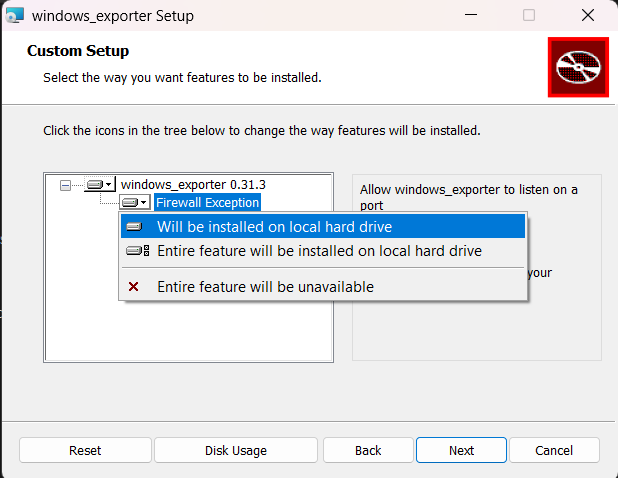
Run downloaded file with administrator rights and select to install firewall exception as on figure
-
Press Next and set parameters in upper field you may set comma-separated list of collectors that you need from list in exporter github page, or set field blank for default collectors. In the second field you may set the path to authentication file in Windows format. In the third field, indicate the port number on which the exporter will expose metrics. Leave the fourth field empty
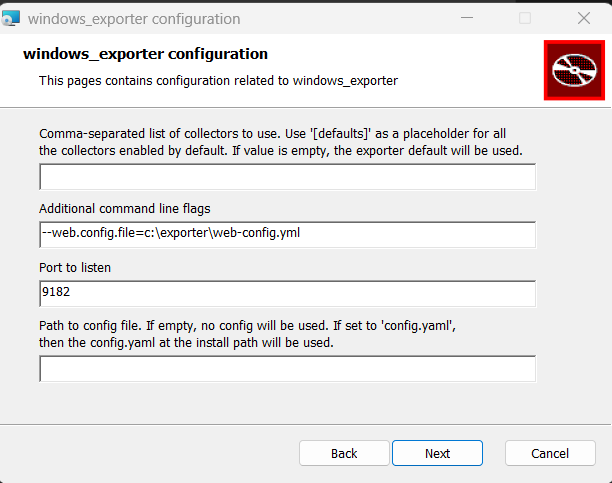
Exporter is installed as a service and exposes metrics.
3. Check configuration
Check with browser if it is accessible at:
https://resource-hostname-or-ip:9100/metrics
Check the system services and you see
